Having a professional digital portfolio is essential for any creative who wants to stand out in the job market. A portfolio centralizes your work and presents it professionally. It allows potential clients or employers to see your style, skills and experience at a glance. A strong digital portfolio also boosts your visibility and credibility in your field.
1. What a Professional Digital Portfolio Is and Why It Matters
It is a way to showcase yourself in the professional world. A portfolio highlights the work that best represents your style. It also increases visibility, builds credibility and opens doors to concrete job opportunities.
Potential employers or clients will review your digital portfolio to understand your experience. Portfolios can be digital or physical. In the design industry, digital portfolios are currently the most popular option. Anyways, sending a physical portfolio can still be innovative.
2. Key Elements of a Professional Digital Portfolio
A well-structured digital portfolio showcases your work and strengthens your personal brand and builds trust. These are key five essential elements:
- Featured Projects: Select your best work strategically. Quality is more strategic than quantity.
- Professional bio: Provide a brief, clear and approachable summary of who you are, your skills and relevant experience.
- Testimonials or recommendations: Include comments from clients, colleagues or mentors to improve credibility and strengthen your reputation.
- Contact and professional links: Make it easy to get in touch with a form, email (optional) and links to platforms where you showcase your work, like LinkedIn, Behance or GitHub.
- Optional Sections: Add a blog, resource downloads, a PDF resume or links to courses and extra projects that add value and reinforce your expertise.
With these elements organized well, your professional digital portfolio becomes a powerful tool to highlight your talent and open new opportunities.
3. How to Structure Your Professional Digital Portfolio
Organizing your digital portfolio clearly and attractively is key to helping visitors understand your work quickly. Consider keep a clean visual layout that’s easy to navigate, with UX-friendly design guiding users naturally. Establish a hierarchy: start with main projects, then secondary ones and finally extras.
This ensures your most important work receives the attention it deserves. Maintain intuitive navigation and avoid complicated menus or unnecessary sections. A minimalist aesthetic allows your projects to shine without distractions. Use categories or tags to group work by type, technique, or specialty.
This organizes content but also demonstrates versatility and areas of expertise. Ensure each section has clear, consistent titles. Finally, review your structure regularly so your portfolio evolves alongside your projects and maintains a professional, attractive experience.
4. Tools and Platforms to Build Your Digital Portfolio
Several user-friendly platforms let you create a professional digital portfolio, each with its pros and cons. For example, Squarespace offers elegant templates and advanced customization, though it is more expensive. Wix is intuitive and flexible, ideal for beginners, though loading speed may be slightly slower. WordPress allows maximum customization and scalability but requires some learning and maintenance.
Notion is great for minimalistic, organized portfolios, though less visual than other platforms. Additionally, Behance works well for designers and creatives seeking visibility within the community, though it offers less site customization.
Complement your portfolio with design and multimedia tools like Adobe Creative Cloud, Canva, or Figma. These tools make creating images, presentations and professional prototypes easy. Some of these platforms also offer affiliate programs, such as Adobe or Canva, letting you recommend them to your audience while earning extra income.
5. Common Mistakes When Creating a Professional Digital Portfolio
Even a professional digital portfolio can lose impact if mistakes occur. Avoiding them helps you present your work more professionally and attractively:
- Overloading Content: Too many projects or too much information can overwhelm visitors and distract from your best work.
- Low-Quality Images: Blurry photos, screenshots or graphics hurt perceived professionalism.
- Lack of Visual Consistency: Inconsistent style, typography or colors create confusion.
- Missing Contact Section: It’s important for visitors to understand how to reach you to avoid missing opportunities.
- Not Updating Regularly: An outdated portfolio signals inactivity or lack of commitment.
Furthermore, avoiding these errors ensures your professional digital portfolio communicates confidence, quality and seriousness from the first glance.
6. Top Design Portfolios to Learn From
These portfolios serve as key references for learning how to combine creativity, technique and professional presentation. Each demonstrates different ways to structure projects that grab attention and reflect a unique style.
Andrea Pereira Portfolio
This portfolio is an excellent example of versatility in graphic design, spanning illustration, editorial projects and advertising. Her work stands out for visual quality, clear organization and storytelling behind each project.
Andrea uses professional tools like InDesign, Illustrator and Photoshop, creating impactful and cohesive pieces. Exploring her portfolio on Behance inspires other creatives to structure their projects professionally and attractively.
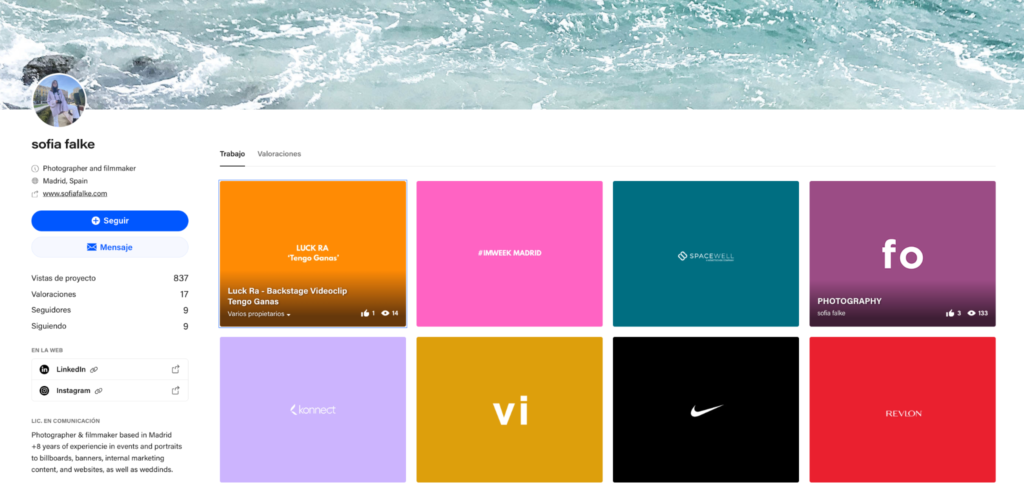
Sofia Falke Portfolio
Sofia Falke’s digital portfolio, founder of Cultureo, showcases her photography and video projects, highlighting work that combines creativity and audiovisual technique. Her projects reflect mastery of professional tools like Premiere Pro, Lightroom and Photoshop. This demonstrates her ability to edit, retouch and produce high-quality content.
The structure clearly communicates visual storytelling and coherence between photography and video. This makes it easy for potential clients to understand her style.
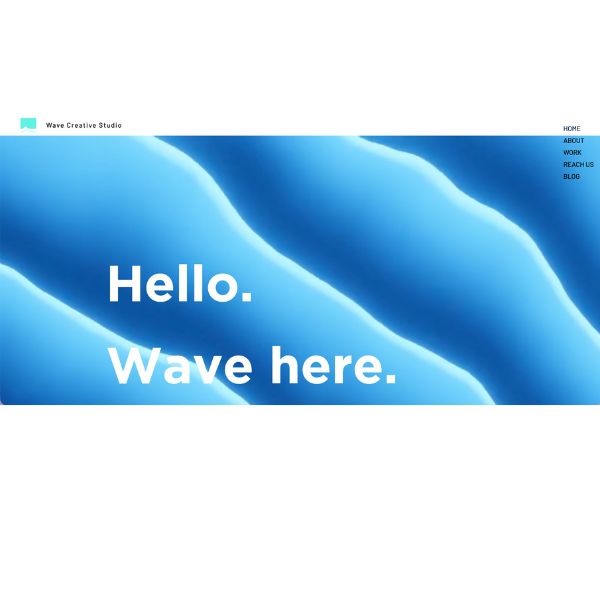
Wave Creative Studio Portfolio
Wave Creative Studio’s portfolio shows how an agency can display multidisciplinary work,. It combines advertising, art direction, copywriting, photography, filmmaking, graphic design and social media strategies.
Projects for well-known brands like Revlon, Nike and Cutex stand out for visual quality and narrative consistency. The agency uses its website and Behance to centralize work, making it easy for clients to explore case studies.
7. How to Keep Your Professional Digital Portfolio Updated
Keeping your portfolio current ensures it always reflects your best work and professional growth.
- Regular updates and recent projects: Refresh projects to showcase your latest, most relevant experience.
- Adapt design to UX/UI trends: Adjust your portfolio to new design and user experience trends to stay modern and attractive.
- Add new testimonials or achievements: Include recent recommendations, awards, or certifications to boost credibility.
An updated portfolio communicates confidence, shows constant progress and keeps your personal brand relevant.
When Your Work Tells the Story
Creating a professional digital portfolio can be achievable following key steps: clear structure, featured projects, proper tools and regular updates. Avoiding common mistakes ensures your work looks professional and trustworthy. Learning from reference portfolios helps you organize and present projects effectively. Ultimately, keeping your portfolio updated reflects growth and commitment to your career.